 Flutter Gems
Flutter Gems is a curated list of 7250+ useful Dart & Flutter packages that are categorized based on functionality.
Top Flutter Clock packages
Last updated: May 18, 2026
Clock widgets display the current time, either as a digital readout or an animated analog face.
Best Practices for Clocks
- Time Zones: Always be explicit about whether the clock is displaying local device time or a specific time zone (e.g., UTC). If displaying international clocks, clearly label the corresponding city.
- Animation Efficiency: For analog clocks, only repaint the widget once per second (or once per minute if no second hand exists). Redrawing the clock 60 times a second using a generic animation loop will drain the battery unnecessarily.
- Server Sync: If accurate time is critical (like for a ticketing app or auction), do not rely on
DateTime.now(), as users can manually change their device time. Fetch the true time from an NTP server.
The complete list of Custom Clocks, Analog Clocks, and Digital Clock packages for Flutter is provided below.
analog_clock
👍 88 ⬇️ 3K
Dart 3 compatibleMaintenance Status: Poor






Flutter Analog Clock plugin.
flutter_analog_clock
👍 67 ⬇️ 481
Dart 3 compatibleMaintenance Status: Poor
A simple, highly customizable analog clock widget. This widget enables you to customize the clock's background, dial, markings, and hands.
clock_loader
👍 61 ⬇️ 57
Dart 3 compatibleMaintenance Status: Poor
A clock loader which you can use to display a smooth and great loading effect.
one_clock
👍 54 ⬇️ 1.1K
Dart 3 compatibleMaintenance Status: Good
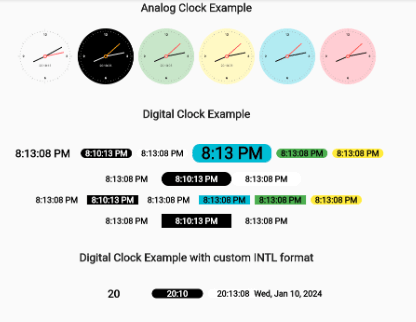
Flutter analog and digital clock plugin. This plugin can be used to draw beautiful analog as well as digital clock for your flutter application
animated_analog_clock
👍 16 ⬇️ 191
Dart 3 compatibleMaintenance Status: Good
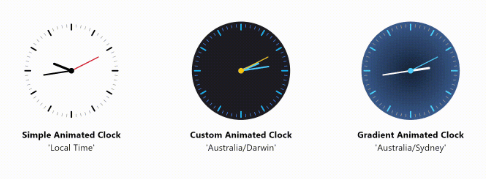
A customizable and animated analog clock widget for Flutter applications.